---
title: How to configure the datepicker.
description: This article will go over the functionalities of the datepicker inside the SiteManager form. You will need at least design access to be able to configure these options.
---
[Skip to content](https://support.sitemanager.io/en/forms/general/how-to-configure-the-datepicker#main-content)
[](https://support.sitemanager.io/en?hsLang=en)
Open main navigation
Close main navigation
- [Go to sitemanager.io](https://www.sitemanager.io/)
[Go to sitemanager.io](https://www.sitemanager.io/)
How can we help?
- There are no suggestions because the search field is empty.
1. [Knowledge Base](https://support.sitemanager.io/en?hsLang=en)
2. [Forms](https://support.sitemanager.io/en/forms?hsLang=en)
3. [General](https://support.sitemanager.io/en/forms?hsLang=en#general)
# How to configure the datepicker.
## This article will go over the functionalities of the datepicker inside the SiteManager form. You will need at least design access to be able to configure these options.
1. 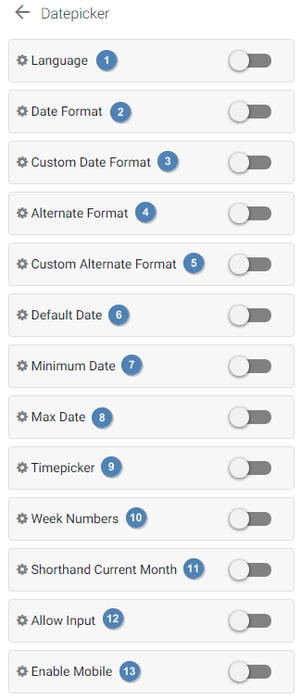**Language:** The language in which dates will be shown. All months, weeks and days will be shown in the selected language.
2. **Date format:** The format in which the date will be formatted. This format will always be sent to the server, but can be overwritten with an alternate format, to show a different format to the visitor.
3. **Custom date format:** The format in which the date will be formatted. You can customize the format freely however you want. Be sure to only use valid formats, as broken down [below](https://support.sitemanager.io/en/forms/general/how-to-configure-the-datepicker#format).
4. **Alternate format:** The format that will be shown to the visitor.
5. **Custom alternate format:** The format that will be shown to the visitor. You can customize the format freely however you want. Be sure to only use valid formats, as broken down [below](https://support.sitemanager.io/en/forms/general/how-to-configure-the-datepicker#format).
6. **Default date:** The initial selected date in the datepicker. [See here](https://support.sitemanager.io/en/forms/general/how-to-configure-the-datepicker#datestrings) for more explanation about valid inputs.
7. **Minimum date:** The minimum date that can be selected by the user. [See here](https://support.sitemanager.io/en/forms/general/how-to-configure-the-datepicker#datestrings) for more explanation about valid inputs.
8. **Maximum date:** The maximum date that can be selected by the user. [See here](https://support.sitemanager.io/en/forms/general/how-to-configure-the-datepicker#datestrings) for more explanation about valid inputs.
9. **Timepicker:** Whether to also show a timepicker. You can further configure the timepicker to your liking here.
10. **Week numbers:** Enables display of week numbers in the calendar.
11. **Shorthand current month:** Choose whether to show the current month in a shorthand version or to display the full name.
12. **Allow input:** Allow the user to manually input a date.
13. **Enable mobile:** Enable or disable the datepicker on mobile. **We strongly advise to use the native datepicker**, except if you're using a lot of functionalities, such as the timepicker. A native datepicker will always be superior to the custom one on mobile devices.
### Date format
Each character in the table below can be used in **Custom date format** and **Custom alternate format** options to achieve the format you need.
#### Date formatting tokens
| **Character** | **Description** | **Example** |
| --- | --- | --- |
| d | Day of the month, 2 digits with leading zeros | 01 to 31 |
| D | A textual representation of a day | Mon through Sun |
| l (lowercase 'L') | A full textual representation of the day of the week | Sunday through Saturday |
| j | Day of the month without leading zeros | 1 to 31 |
| J | Day of the month without leading zeros and ordinal suffix | 1st, 2nd, to 31st |
| w | Numeric representation of the day of the week | 0 (for Sunday) through 6 (for Saturday) |
| W | Numeric representation of the week | 0 (first week of the year) through 52 (last week of the year) |
| F | A full textual representation of a month | January through December |
| m | Numeric representation of a month, with leading zero | 01 through 12 |
| n | Numeric representation of a month, without leading zeros | 1 through 12 |
| M | A short textual representation of a month | Jan through Dec |
| U | The number of seconds since the Unix Epoch | 1413704993 |
| y | A two digit representation of a year | 99 or 03 |
| Y | A full numeric representation of a year, 4 digits | 1999 or 2003 |
| Z | ISO Date format | 2017-03-04T01:23:43.000Z |
#### Time formatting tokens
| **Character** | **Description** | **Example** |
| --- | --- | --- |
| H | Hours (24 hours) | 00 to 23 |
| h | Hours | 1 to 12 |
| G | Hours, 2 digits with leading zeros | 1 to 12 |
| i | Minutes | 00 to 59 |
| S | Seconds, 2 digits | 00 to 59 |
| s | Seconds | 0, 1 to 59 |
| K | AM/PM | AM or PM |
### Supported dates
It is possible to supply a date for the default date, minimum date and maximum date. This date should be in a specific format, otherwise it won't be recognized. See the list below for the supported formats.
- **The shortcut today:** Using **today** will always set the date to the current day. This way you don't have to manually update this value each day.
- **Dates in the current format:** You can input your date in the **same exact format** that you have configured in the relevant panel. For example, the default format is **Y-m-d G:i**, so the following dates are all valid:
- 2016
- 2016-10
- 2016-10-20
- 2016-10-20 15
- 2016-10-20 15:30
- **ISO date:** A valid ISO date can be used to supply a date. For example, **2017-02-26T19:40:03.243Z** is a valid ISO date. [See here](https://www.w3.org/TR/NOTE-datetime) for more info regarding ISO dates.
- [Getting Started](https://support.sitemanager.io/en/getting-started?hsLang=en)
- [Dashboard](https://support.sitemanager.io/en/dashboard?hsLang=en#main-content)
- [Getting Started](https://support.sitemanager.io/en/dashboard?hsLang=en#getting-started)
- [Project Dashboard](https://support.sitemanager.io/en/dashboard?hsLang=en#project-dashboard)
- [White Label & Add-ons](https://support.sitemanager.io/en/dashboard?hsLang=en#white-label-add-ons)
- [Account](https://support.sitemanager.io/en/account?hsLang=en#main-content)
- [Account Settings](https://support.sitemanager.io/en/account?hsLang=en#account-settings)
- [My Company](https://support.sitemanager.io/en/account?hsLang=en#my-company)
- [Subscription](https://support.sitemanager.io/en/account?hsLang=en#subscription)
- [Project](https://support.sitemanager.io/en/project?hsLang=en#main-content)
- [General](https://support.sitemanager.io/en/project?hsLang=en#general)
- [Upgrade Project](https://support.sitemanager.io/en/project?hsLang=en#upgrade-project)
- [SEO](https://support.sitemanager.io/en/seo?hsLang=en#main-content)
- [Basics](https://support.sitemanager.io/en/seo?hsLang=en#basics)
- [Advanced](https://support.sitemanager.io/en/seo?hsLang=en#advanced)
- [Go Live](https://support.sitemanager.io/en/go-live?hsLang=en#main-content)
- [Prepare Project](https://support.sitemanager.io/en/go-live?hsLang=en#prepare-project)
- [Prepare Domain](https://support.sitemanager.io/en/go-live?hsLang=en#prepare-domain)
- [Going Live](https://support.sitemanager.io/en/go-live?hsLang=en#going-live)
- [Advanced](https://support.sitemanager.io/en/go-live?hsLang=en#advanced)
- [Content](https://support.sitemanager.io/en/content?hsLang=en#main-content)
- [Getting Started](https://support.sitemanager.io/en/content?hsLang=en#getting-started)
- [Page Management](https://support.sitemanager.io/en/content?hsLang=en#page-management)
- [Content Management](https://support.sitemanager.io/en/content?hsLang=en#content-management)
- [Language Management](https://support.sitemanager.io/en/content?hsLang=en#language-management)
- [Media Library](https://support.sitemanager.io/en/content?hsLang=en#media-library)
- [Collaborating on a project](https://support.sitemanager.io/en/content?hsLang=en#collaborating-on-a-project)
- [Page Components](https://support.sitemanager.io/en/page-components?hsLang=en#main-content)
- [Getting Started](https://support.sitemanager.io/en/page-components?hsLang=en#getting-started)
- [HTML](https://support.sitemanager.io/en/page-components?hsLang=en#html)
- [CSS](https://support.sitemanager.io/en/page-components?hsLang=en#css)
- [JavaScript (JS)](https://support.sitemanager.io/en/page-components?hsLang=en#javascript-js)
- [How To](https://support.sitemanager.io/en/page-components?hsLang=en#how-to)
- [Layout Components](https://support.sitemanager.io/en/layout-components?hsLang=en)
- [No-Code Editor](https://support.sitemanager.io/en/no-code-editor?hsLang=en#main-content)
- [Getting Started](https://support.sitemanager.io/en/no-code-editor?hsLang=en#getting-started)
- [Properties](https://support.sitemanager.io/en/no-code-editor?hsLang=en#properties)
- [Advanced](https://support.sitemanager.io/en/no-code-editor?hsLang=en#advanced)
- [Design](https://support.sitemanager.io/en/design?hsLang=en#main-content)
- [Overview](https://support.sitemanager.io/en/design?hsLang=en#overview)
- [Design editor](https://support.sitemanager.io/en/design?hsLang=en#design-editor)
- [Design Panels](https://support.sitemanager.io/en/design?hsLang=en#design-panels)
- [Responsive](https://support.sitemanager.io/en/design?hsLang=en#responsive)
- [Fonts](https://support.sitemanager.io/en/design?hsLang=en#fonts)
- [Layouts](https://support.sitemanager.io/en/design?hsLang=en#layouts)
- [Code](https://support.sitemanager.io/en/code?hsLang=en#main-content)
- [Introduction](https://support.sitemanager.io/en/code?hsLang=en#introduction)
- [Token Management](https://support.sitemanager.io/en/code?hsLang=en#token-management)
- [Project Setup](https://support.sitemanager.io/en/code?hsLang=en#project-setup)
- [ToolStack](https://support.sitemanager.io/en/code?hsLang=en#toolstack)
- [Private Library](https://support.sitemanager.io/en/code?hsLang=en#private-library)
- [Dynamic Content](https://support.sitemanager.io/en/dynamic-content?hsLang=en#main-content)
- [Getting started](https://support.sitemanager.io/en/dynamic-content?hsLang=en#getting-started)
- [Basics](https://support.sitemanager.io/en/dynamic-content?hsLang=en#basics)
- [Advanced](https://support.sitemanager.io/en/dynamic-content?hsLang=en#advanced)
- [External Content](https://support.sitemanager.io/en/external-content?hsLang=en#main-content)
- [Getting started](https://support.sitemanager.io/en/external-content?hsLang=en#getting-started)
- [Configuration & implementation](https://support.sitemanager.io/en/external-content?hsLang=en#configuration-implementation)
- [Logic (Smart Content)](https://support.sitemanager.io/en/logic-smart-content?hsLang=en#main-content)
- [Getting Started](https://support.sitemanager.io/en/logic-smart-content?hsLang=en#getting-started)
- [Configuration & Implementation](https://support.sitemanager.io/en/logic-smart-content?hsLang=en#configuration-implementation)
- [Logic](https://support.sitemanager.io/en/logic-smart-content?hsLang=en#logic)
- [AB testing](https://support.sitemanager.io/en/logic-smart-content?hsLang=en#ab-testing)
- [Timed Content](https://support.sitemanager.io/en/logic-smart-content?hsLang=en#timed-content)
- [Password Protected Content](https://support.sitemanager.io/en/logic-smart-content?hsLang=en#password-protected-content)
- [Smart API](https://support.sitemanager.io/en/logic-smart-content?hsLang=en#smart-api)
- [Integrations](https://support.sitemanager.io/en/integrations?hsLang=en#main-content)
- [Getting Started](https://support.sitemanager.io/en/integrations?hsLang=en#getting-started)
- [Integrations](https://support.sitemanager.io/en/integrations?hsLang=en#integrations)
- [Advanced](https://support.sitemanager.io/en/integrations?hsLang=en#advanced)
- [Modules](https://support.sitemanager.io/en/modules?hsLang=en#main-content)
- [Getting Started](https://support.sitemanager.io/en/modules?hsLang=en#getting-started)
- [Modules](https://support.sitemanager.io/en/modules?hsLang=en#modules)
- [Upgrade Center](https://support.sitemanager.io/en/upgrade-center?hsLang=en#main-content)
- [Components](https://support.sitemanager.io/en/upgrade-center?hsLang=en#components)
- [Forms](https://support.sitemanager.io/en/forms?hsLang=en#main-content)
- [General](https://support.sitemanager.io/en/forms?hsLang=en#general)
- [Captcha](https://support.sitemanager.io/en/forms?hsLang=en#captcha)
- [Form Actions](https://support.sitemanager.io/en/forms?hsLang=en#form-actions)
- [Extending Forms](https://support.sitemanager.io/en/forms?hsLang=en#extending-forms)
- [Email Templates](https://support.sitemanager.io/en/forms?hsLang=en#email-templates)
- [Advanced](https://support.sitemanager.io/en/forms?hsLang=en#advanced)
- [Cookie Settings](https://support.sitemanager.io/en/cookie-settings?hsLang=en#main-content)
- [Getting Started](https://support.sitemanager.io/en/cookie-settings?hsLang=en#getting-started)
- [Configuration](https://support.sitemanager.io/en/cookie-settings?hsLang=en#configuration)
- [API Call](https://support.sitemanager.io/en/api-call?hsLang=en#main-content)
- [Configuration](https://support.sitemanager.io/en/api-call?hsLang=en#configuration)
[](https://support.sitemanager.io/en?hsLang=en)
Copyright © 2026, SiteManager Group