---
title: How to add an Instagram Feed to your website
description: "⚠️ The Instagram integration will no longer work, we are investing this issue! However, in this article we cover an external platform that allows you to show your Instagram feed. Step 1: Install the I"
---
[Skip to content](https://support.sitemanager.io/en/integrations/how-to-add-an-instagram-feed-to-your-website#main-content)
[](https://support.sitemanager.io/en?hsLang=en)
Open main navigation
Close main navigation
- [Go to sitemanager.io](https://www.sitemanager.io/)
[Go to sitemanager.io](https://www.sitemanager.io/)
How can we help?
- There are no suggestions because the search field is empty.
1. [Knowledge Base](https://support.sitemanager.io/en?hsLang=en)
2. [Integrations](https://support.sitemanager.io/en/integrations?hsLang=en)
3. [Integrations](https://support.sitemanager.io/en/integrations?hsLang=en#integrations)
# How to add an Instagram Feed to your website
⚠️ The Instagram integration will no longer work, we are investing this issue! However, in [this](https://support.sitemanager.io/en/integrations/how-to-integrate-instagram-external?hsLang=en) article we cover an external platform that allows you to show your Instagram feed.
### In this article
[Step 1: Install the Instagram integration](https://support.sitemanager.io/en/integrations/how-to-add-an-instagram-feed-to-your-website#install)
[Step 2: Add the Instagram Feed in the CMS](https://support.sitemanager.io/en/integrations/how-to-add-an-instagram-feed-to-your-website#add)
[Step 3: Customize](https://support.sitemanager.io/en/integrations/how-to-add-an-instagram-feed-to-your-website#customize)
### Step 1: Install the Instagram integration
To install the Instagram Integration, we first have to navigate to the *General Settings* of the project.
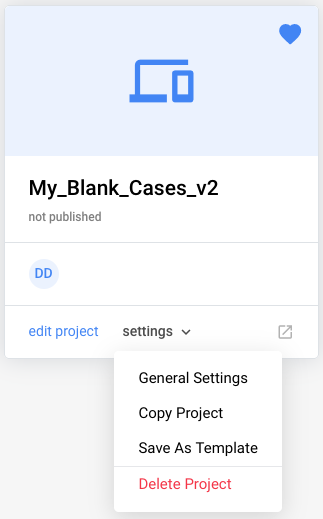
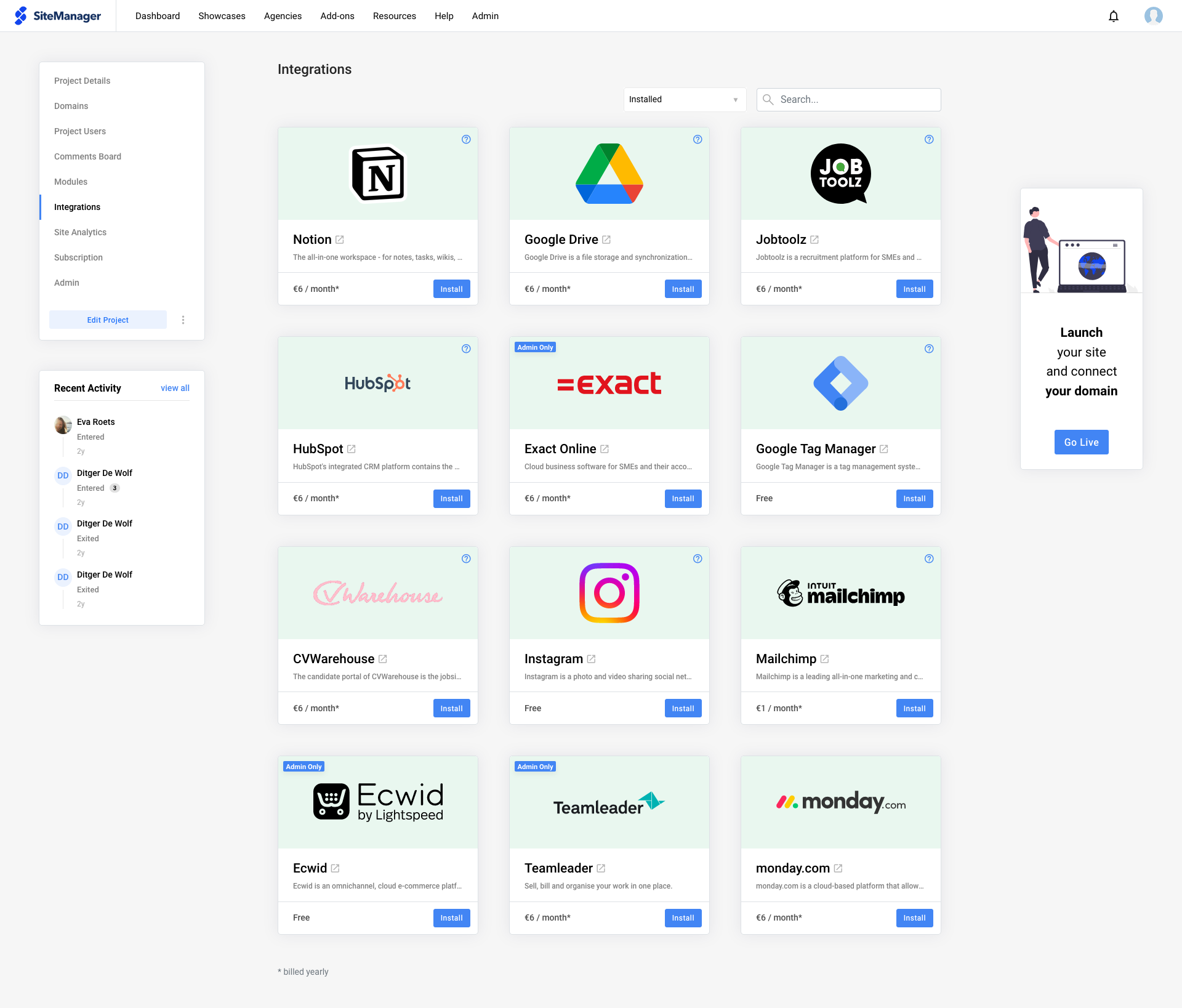
Once we open the *Integrations* tab, we can install the Instagram Integration.
To link your Instagram account, simply click on the Connect button after installing the integration.
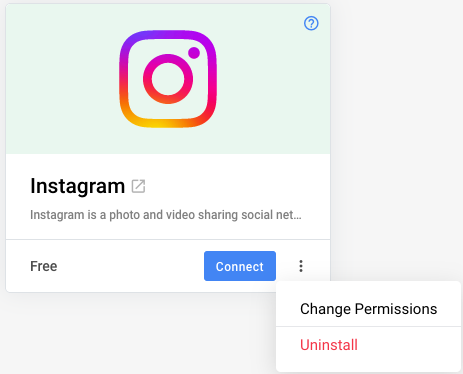
Using *Change Permissions* you can allow the user to link their account.
### Step 2: Add the Instagram Feed in the CMS
- After adding the *Instagram Integration*, a new component will be available in the Grid Editor.
### Step 3: Customize
After creating your Instagram Feed component, you can decide to leave the component as is, or tweak it with our [**design panels**](https://support.sitemanager.io/sitemanager-design/design-panels/panels?hsLang=en) and **functionality panel**.
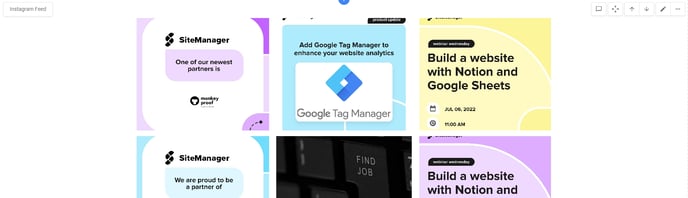
- **Click** the gear wheel in the top-left corner of the IG Feed component from the design view to access the functionality panel.
- Select the options that apply for you:
- **Show caption:** enabled by default and visible upon hover. However, style this as you like.
- **Amount:** render 6 (or less, if not available) of your latest images from the connected Instagram account by default on every click of the load more button (if enabled).
- **Enable load more:** show a button to render more images from your Instagram live feed. This is disabled by default.
- [Getting Started](https://support.sitemanager.io/en/getting-started?hsLang=en)
- [Dashboard](https://support.sitemanager.io/en/dashboard?hsLang=en#main-content)
- [Getting Started](https://support.sitemanager.io/en/dashboard?hsLang=en#getting-started)
- [Project Dashboard](https://support.sitemanager.io/en/dashboard?hsLang=en#project-dashboard)
- [White Label & Add-ons](https://support.sitemanager.io/en/dashboard?hsLang=en#white-label-add-ons)
- [Account](https://support.sitemanager.io/en/account?hsLang=en#main-content)
- [Account Settings](https://support.sitemanager.io/en/account?hsLang=en#account-settings)
- [My Company](https://support.sitemanager.io/en/account?hsLang=en#my-company)
- [Subscription](https://support.sitemanager.io/en/account?hsLang=en#subscription)
- [Project](https://support.sitemanager.io/en/project?hsLang=en#main-content)
- [General](https://support.sitemanager.io/en/project?hsLang=en#general)
- [Upgrade Project](https://support.sitemanager.io/en/project?hsLang=en#upgrade-project)
- [SEO](https://support.sitemanager.io/en/seo?hsLang=en#main-content)
- [Basics](https://support.sitemanager.io/en/seo?hsLang=en#basics)
- [Advanced](https://support.sitemanager.io/en/seo?hsLang=en#advanced)
- [Go Live](https://support.sitemanager.io/en/go-live?hsLang=en#main-content)
- [Prepare Project](https://support.sitemanager.io/en/go-live?hsLang=en#prepare-project)
- [Prepare Domain](https://support.sitemanager.io/en/go-live?hsLang=en#prepare-domain)
- [Going Live](https://support.sitemanager.io/en/go-live?hsLang=en#going-live)
- [Advanced](https://support.sitemanager.io/en/go-live?hsLang=en#advanced)
- [Content](https://support.sitemanager.io/en/content?hsLang=en#main-content)
- [Getting Started](https://support.sitemanager.io/en/content?hsLang=en#getting-started)
- [Page Management](https://support.sitemanager.io/en/content?hsLang=en#page-management)
- [Content Management](https://support.sitemanager.io/en/content?hsLang=en#content-management)
- [Language Management](https://support.sitemanager.io/en/content?hsLang=en#language-management)
- [Media Library](https://support.sitemanager.io/en/content?hsLang=en#media-library)
- [Collaborating on a project](https://support.sitemanager.io/en/content?hsLang=en#collaborating-on-a-project)
- [Page Components](https://support.sitemanager.io/en/page-components?hsLang=en#main-content)
- [Getting Started](https://support.sitemanager.io/en/page-components?hsLang=en#getting-started)
- [HTML](https://support.sitemanager.io/en/page-components?hsLang=en#html)
- [CSS](https://support.sitemanager.io/en/page-components?hsLang=en#css)
- [JavaScript (JS)](https://support.sitemanager.io/en/page-components?hsLang=en#javascript-js)
- [How To](https://support.sitemanager.io/en/page-components?hsLang=en#how-to)
- [Layout Components](https://support.sitemanager.io/en/layout-components?hsLang=en)
- [No-Code Editor](https://support.sitemanager.io/en/no-code-editor?hsLang=en#main-content)
- [Getting Started](https://support.sitemanager.io/en/no-code-editor?hsLang=en#getting-started)
- [Properties](https://support.sitemanager.io/en/no-code-editor?hsLang=en#properties)
- [Advanced](https://support.sitemanager.io/en/no-code-editor?hsLang=en#advanced)
- [Design](https://support.sitemanager.io/en/design?hsLang=en#main-content)
- [Overview](https://support.sitemanager.io/en/design?hsLang=en#overview)
- [Design editor](https://support.sitemanager.io/en/design?hsLang=en#design-editor)
- [Design Panels](https://support.sitemanager.io/en/design?hsLang=en#design-panels)
- [Responsive](https://support.sitemanager.io/en/design?hsLang=en#responsive)
- [Fonts](https://support.sitemanager.io/en/design?hsLang=en#fonts)
- [Layouts](https://support.sitemanager.io/en/design?hsLang=en#layouts)
- [Code](https://support.sitemanager.io/en/code?hsLang=en#main-content)
- [Introduction](https://support.sitemanager.io/en/code?hsLang=en#introduction)
- [Token Management](https://support.sitemanager.io/en/code?hsLang=en#token-management)
- [Project Setup](https://support.sitemanager.io/en/code?hsLang=en#project-setup)
- [ToolStack](https://support.sitemanager.io/en/code?hsLang=en#toolstack)
- [Private Library](https://support.sitemanager.io/en/code?hsLang=en#private-library)
- [Dynamic Content](https://support.sitemanager.io/en/dynamic-content?hsLang=en#main-content)
- [Getting started](https://support.sitemanager.io/en/dynamic-content?hsLang=en#getting-started)
- [Basics](https://support.sitemanager.io/en/dynamic-content?hsLang=en#basics)
- [Advanced](https://support.sitemanager.io/en/dynamic-content?hsLang=en#advanced)
- [External Content](https://support.sitemanager.io/en/external-content?hsLang=en#main-content)
- [Getting started](https://support.sitemanager.io/en/external-content?hsLang=en#getting-started)
- [Configuration & implementation](https://support.sitemanager.io/en/external-content?hsLang=en#configuration-implementation)
- [Logic (Smart Content)](https://support.sitemanager.io/en/logic-smart-content?hsLang=en#main-content)
- [Getting Started](https://support.sitemanager.io/en/logic-smart-content?hsLang=en#getting-started)
- [Configuration & Implementation](https://support.sitemanager.io/en/logic-smart-content?hsLang=en#configuration-implementation)
- [Logic](https://support.sitemanager.io/en/logic-smart-content?hsLang=en#logic)
- [AB testing](https://support.sitemanager.io/en/logic-smart-content?hsLang=en#ab-testing)
- [Timed Content](https://support.sitemanager.io/en/logic-smart-content?hsLang=en#timed-content)
- [Password Protected Content](https://support.sitemanager.io/en/logic-smart-content?hsLang=en#password-protected-content)
- [Smart API](https://support.sitemanager.io/en/logic-smart-content?hsLang=en#smart-api)
- [Integrations](https://support.sitemanager.io/en/integrations?hsLang=en#main-content)
- [Getting Started](https://support.sitemanager.io/en/integrations?hsLang=en#getting-started)
- [Integrations](https://support.sitemanager.io/en/integrations?hsLang=en#integrations)
- [Advanced](https://support.sitemanager.io/en/integrations?hsLang=en#advanced)
- [Modules](https://support.sitemanager.io/en/modules?hsLang=en#main-content)
- [Getting Started](https://support.sitemanager.io/en/modules?hsLang=en#getting-started)
- [Modules](https://support.sitemanager.io/en/modules?hsLang=en#modules)
- [Upgrade Center](https://support.sitemanager.io/en/upgrade-center?hsLang=en#main-content)
- [Components](https://support.sitemanager.io/en/upgrade-center?hsLang=en#components)
- [Forms](https://support.sitemanager.io/en/forms?hsLang=en#main-content)
- [General](https://support.sitemanager.io/en/forms?hsLang=en#general)
- [Captcha](https://support.sitemanager.io/en/forms?hsLang=en#captcha)
- [Form Actions](https://support.sitemanager.io/en/forms?hsLang=en#form-actions)
- [Extending Forms](https://support.sitemanager.io/en/forms?hsLang=en#extending-forms)
- [Email Templates](https://support.sitemanager.io/en/forms?hsLang=en#email-templates)
- [Advanced](https://support.sitemanager.io/en/forms?hsLang=en#advanced)
- [Cookie Settings](https://support.sitemanager.io/en/cookie-settings?hsLang=en#main-content)
- [Getting Started](https://support.sitemanager.io/en/cookie-settings?hsLang=en#getting-started)
- [Configuration](https://support.sitemanager.io/en/cookie-settings?hsLang=en#configuration)
- [API Call](https://support.sitemanager.io/en/api-call?hsLang=en#main-content)
- [Configuration](https://support.sitemanager.io/en/api-call?hsLang=en#configuration)
[](https://support.sitemanager.io/en?hsLang=en)
Copyright © 2026, SiteManager Group