---
title: "Example 1: Create a personalised CTA"
description: With smart content you can create personalised CTA's who perform up to two times better then normal CTA's
---
[Skip to content](https://support.sitemanager.io/en/logic/logic-examples/example-1-create-a-personalised-cta#main-content)
[](https://support.sitemanager.io/en?hsLang=en)
Open main navigation
Close main navigation
- [Go to sitemanager.io](https://www.sitemanager.io/)
[Go to sitemanager.io](https://www.sitemanager.io/)
How can we help?
- There are no suggestions because the search field is empty.
1. [Knowledge Base](https://support.sitemanager.io/en?hsLang=en)
2. [Logic (Smart Content)](https://support.sitemanager.io/en/logic-smart-content?hsLang=en)
3. [Logic](https://support.sitemanager.io/en/logic-smart-content?hsLang=en#logic)
# Example 1: Create a personalised CTA
## With smart content you can create personalised CTA's who perform up to two times better then normal CTA's
Our Smart Content module has recently been renamed to Logic. All documentation will be updated with the new name in the future.
We are going to show you how to build a simple personalised Call To Action (CTA) content section with the Smart Content Module.
It is important you read the basic get started documents first:
[https://support.sitemanager.io/what-is-smart-content](https://support.sitemanager.io/what-is-smart-content?hsLang=en)
[https://support.sitemanager.io/installing-smart-content-premium-module](https://support.sitemanager.io/installing-smart-content-premium-module?hsLang=en)
[https://support.sitemanager.io/manage-smart-content](https://support.sitemanager.io/manage-smart-content?hsLang=en)
[https://support.sitemanager.io/smart-content-configuration](https://support.sitemanager.io/smart-content-configuration?hsLang=en)
[https://support.sitemanager.io/implement-smart-content](https://support.sitemanager.io/implement-smart-content?hsLang=en)
[https://support.sitemanager.io/smart-rules-in-the-sitemanager-cms](https://support.sitemanager.io/smart-rules-in-the-sitemanager-cms?hsLang=en)
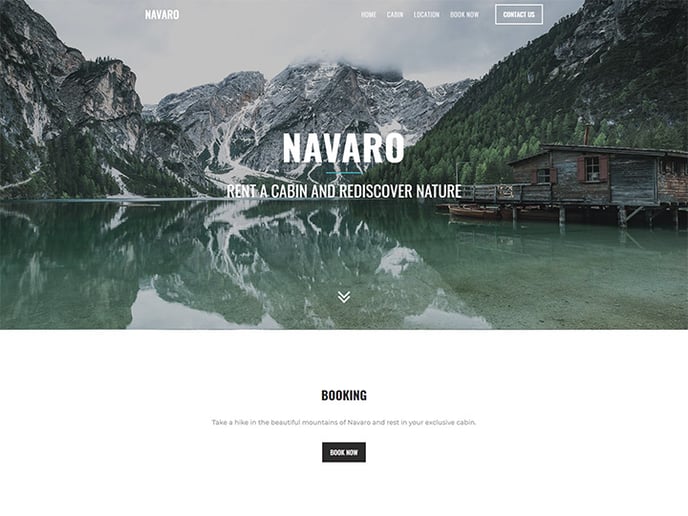
In this fictional example we have build a website for a company that is renting cabins at a lake in the mountains. Our standard website content is tailored towards nature lovers. Below you see the standard booking CTA on our homepage:
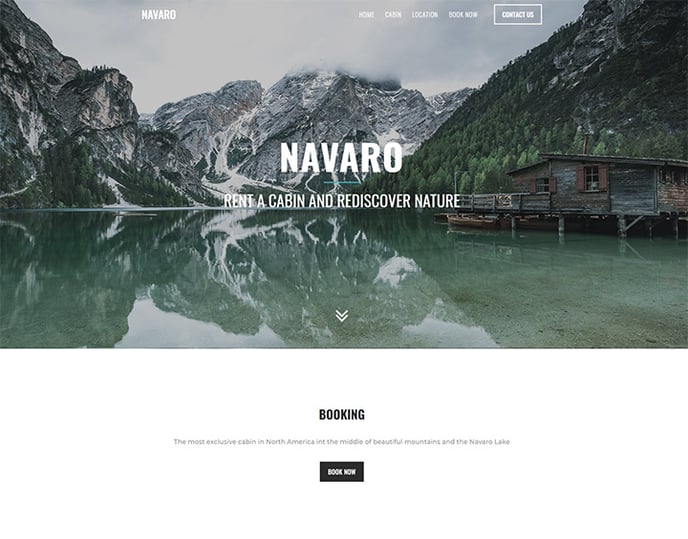
We will create two targeted social media advertisements for hikers and fishermen. Using Smart Content we are going to change our standard CTA text to something more suiting for these groups.
### Step 1. Setup & Configuration
In the code environment we have created two public groups. One for fishermen and one for hikers.
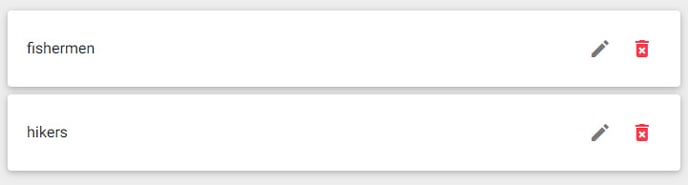
Clicking the pencil icon we can configure the group.
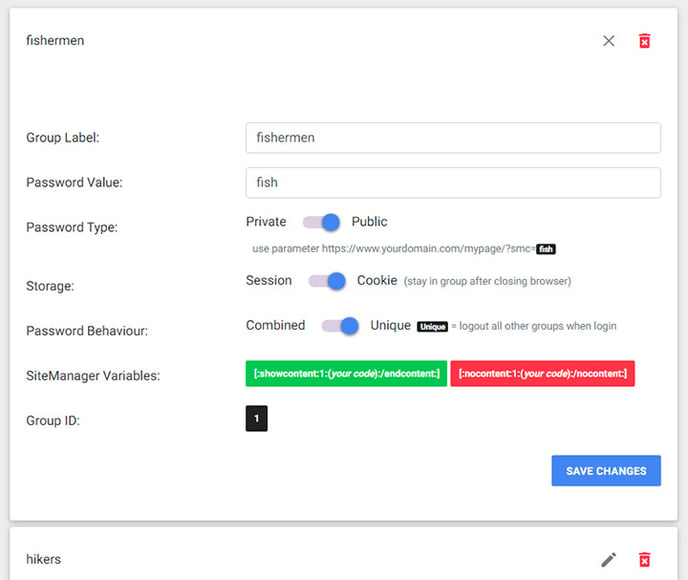
It is important that our password type is **Public** and session is set to **Cookie**. In this example we create unique groups but in more complex configurations it is possible to use combined group logic.
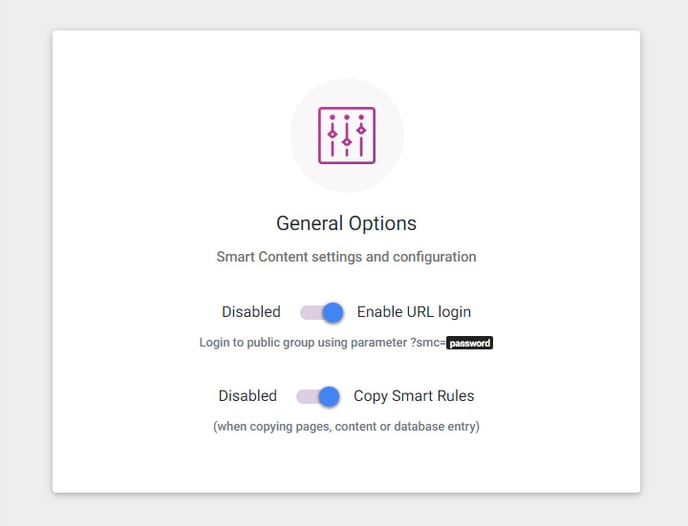
To use our public groups we need to enable the url parameter login in the general options.
When we setup our advertisement it is important to add the &**smc=fish** or &**smc=hike** to the landingspage url. (fish / hike or the public passwords we have set for these groups)
If we are working with a (hidden) landingspage it's also possible to use the ab testing rule for this page to always put the visitor in our selected group (set ab testing percentage for that group to 100%). If we do this we don't even need to add the public password parameter to the page url.
Make sure the Access Logic is enabled for content components:
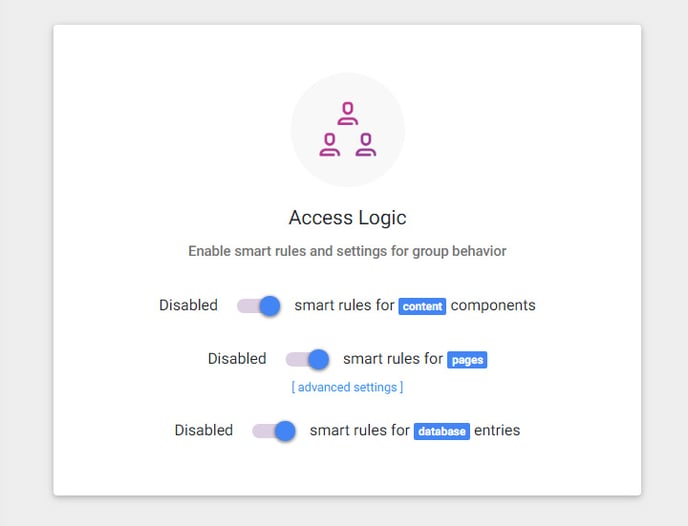
We can also enable this for page properties and databases. In this example we are going to create 3 smart content components.
### Step 2. Create Smart Content
In the SiteManager visual CMS we copied our standard CTA content section twice. We changed our main text to be more specific for fishermen and hikers.
If we would publish the website now all CTA content sections would be shown to the visitor.
We still need to add logic to each of these 3 variants.
When we hover over the a content section we see the options button. Click it.
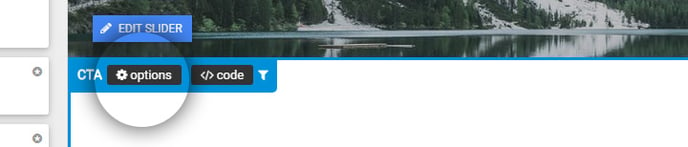
For the standard CTA we need to add the rules to only show this content section when the visitor is not in the fishermen and not in the hikers group. ([https://support.sitemanager.io/smart-rules-in-the-sitemanager-cms](https://support.sitemanager.io/smart-rules-in-the-sitemanager-cms?hsLang=en))
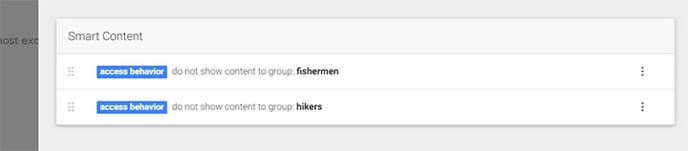
For the fishermen CTA we add the rule to only show this content section when the visitor in in the fishermen group. (\* If our group was not unique we could also add the rules that the visitor can not be in the hikers group)

For the hikers CTA we add the rule to only show this content section when the visitor in in the hikers group.

### Step 3. Publish & Test results
When we are done with adding the smart rules we can publish our website and test our smart content.
When you add the ?smc=fish to any url you will notice that the CTA will change when visiting the homepage:
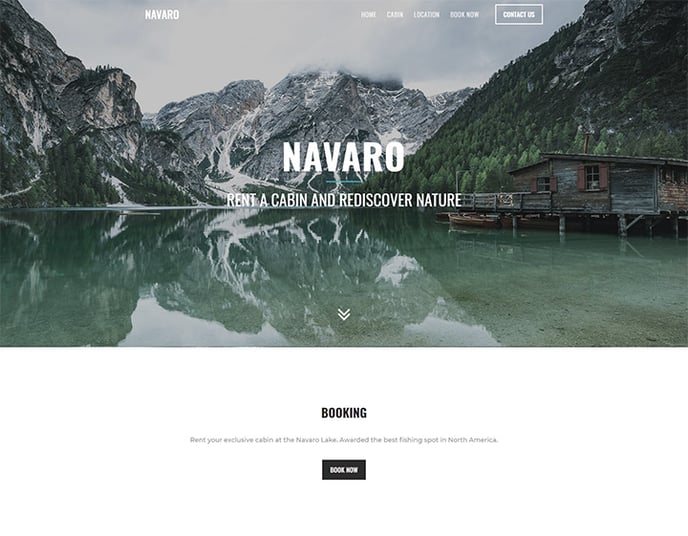
Similarly when you add the ?smc=hike to any page of your website:
if you want to reset the groups visit the url: sitemn.gr/yourproject/**swfiles/lib/logout.php**
Use the public parameters for targeted advertisements, newsletter groups, etc...
- [Getting Started](https://support.sitemanager.io/en/getting-started?hsLang=en)
- [Dashboard](https://support.sitemanager.io/en/dashboard?hsLang=en#main-content)
- [Getting Started](https://support.sitemanager.io/en/dashboard?hsLang=en#getting-started)
- [Project Dashboard](https://support.sitemanager.io/en/dashboard?hsLang=en#project-dashboard)
- [White Label & Add-ons](https://support.sitemanager.io/en/dashboard?hsLang=en#white-label-add-ons)
- [Account](https://support.sitemanager.io/en/account?hsLang=en#main-content)
- [Account Settings](https://support.sitemanager.io/en/account?hsLang=en#account-settings)
- [My Company](https://support.sitemanager.io/en/account?hsLang=en#my-company)
- [Subscription](https://support.sitemanager.io/en/account?hsLang=en#subscription)
- [Project](https://support.sitemanager.io/en/project?hsLang=en#main-content)
- [General](https://support.sitemanager.io/en/project?hsLang=en#general)
- [Upgrade Project](https://support.sitemanager.io/en/project?hsLang=en#upgrade-project)
- [SEO](https://support.sitemanager.io/en/seo?hsLang=en#main-content)
- [Basics](https://support.sitemanager.io/en/seo?hsLang=en#basics)
- [Advanced](https://support.sitemanager.io/en/seo?hsLang=en#advanced)
- [Go Live](https://support.sitemanager.io/en/go-live?hsLang=en#main-content)
- [Prepare Project](https://support.sitemanager.io/en/go-live?hsLang=en#prepare-project)
- [Prepare Domain](https://support.sitemanager.io/en/go-live?hsLang=en#prepare-domain)
- [Going Live](https://support.sitemanager.io/en/go-live?hsLang=en#going-live)
- [Advanced](https://support.sitemanager.io/en/go-live?hsLang=en#advanced)
- [Content](https://support.sitemanager.io/en/content?hsLang=en#main-content)
- [Getting Started](https://support.sitemanager.io/en/content?hsLang=en#getting-started)
- [Page Management](https://support.sitemanager.io/en/content?hsLang=en#page-management)
- [Content Management](https://support.sitemanager.io/en/content?hsLang=en#content-management)
- [Language Management](https://support.sitemanager.io/en/content?hsLang=en#language-management)
- [Media Library](https://support.sitemanager.io/en/content?hsLang=en#media-library)
- [Collaborating on a project](https://support.sitemanager.io/en/content?hsLang=en#collaborating-on-a-project)
- [Page Components](https://support.sitemanager.io/en/page-components?hsLang=en#main-content)
- [Getting Started](https://support.sitemanager.io/en/page-components?hsLang=en#getting-started)
- [HTML](https://support.sitemanager.io/en/page-components?hsLang=en#html)
- [CSS](https://support.sitemanager.io/en/page-components?hsLang=en#css)
- [JavaScript (JS)](https://support.sitemanager.io/en/page-components?hsLang=en#javascript-js)
- [How To](https://support.sitemanager.io/en/page-components?hsLang=en#how-to)
- [Layout Components](https://support.sitemanager.io/en/layout-components?hsLang=en)
- [No-Code Editor](https://support.sitemanager.io/en/no-code-editor?hsLang=en#main-content)
- [Getting Started](https://support.sitemanager.io/en/no-code-editor?hsLang=en#getting-started)
- [Properties](https://support.sitemanager.io/en/no-code-editor?hsLang=en#properties)
- [Advanced](https://support.sitemanager.io/en/no-code-editor?hsLang=en#advanced)
- [Design](https://support.sitemanager.io/en/design?hsLang=en#main-content)
- [Overview](https://support.sitemanager.io/en/design?hsLang=en#overview)
- [Design editor](https://support.sitemanager.io/en/design?hsLang=en#design-editor)
- [Design Panels](https://support.sitemanager.io/en/design?hsLang=en#design-panels)
- [Responsive](https://support.sitemanager.io/en/design?hsLang=en#responsive)
- [Fonts](https://support.sitemanager.io/en/design?hsLang=en#fonts)
- [Layouts](https://support.sitemanager.io/en/design?hsLang=en#layouts)
- [Code](https://support.sitemanager.io/en/code?hsLang=en#main-content)
- [Introduction](https://support.sitemanager.io/en/code?hsLang=en#introduction)
- [Token Management](https://support.sitemanager.io/en/code?hsLang=en#token-management)
- [Project Setup](https://support.sitemanager.io/en/code?hsLang=en#project-setup)
- [ToolStack](https://support.sitemanager.io/en/code?hsLang=en#toolstack)
- [Private Library](https://support.sitemanager.io/en/code?hsLang=en#private-library)
- [Dynamic Content](https://support.sitemanager.io/en/dynamic-content?hsLang=en#main-content)
- [Getting started](https://support.sitemanager.io/en/dynamic-content?hsLang=en#getting-started)
- [Basics](https://support.sitemanager.io/en/dynamic-content?hsLang=en#basics)
- [Advanced](https://support.sitemanager.io/en/dynamic-content?hsLang=en#advanced)
- [External Content](https://support.sitemanager.io/en/external-content?hsLang=en#main-content)
- [Getting started](https://support.sitemanager.io/en/external-content?hsLang=en#getting-started)
- [Configuration & implementation](https://support.sitemanager.io/en/external-content?hsLang=en#configuration-implementation)
- [Logic (Smart Content)](https://support.sitemanager.io/en/logic-smart-content?hsLang=en#main-content)
- [Getting Started](https://support.sitemanager.io/en/logic-smart-content?hsLang=en#getting-started)
- [Configuration & Implementation](https://support.sitemanager.io/en/logic-smart-content?hsLang=en#configuration-implementation)
- [Logic](https://support.sitemanager.io/en/logic-smart-content?hsLang=en#logic)
- [AB testing](https://support.sitemanager.io/en/logic-smart-content?hsLang=en#ab-testing)
- [Timed Content](https://support.sitemanager.io/en/logic-smart-content?hsLang=en#timed-content)
- [Password Protected Content](https://support.sitemanager.io/en/logic-smart-content?hsLang=en#password-protected-content)
- [Smart API](https://support.sitemanager.io/en/logic-smart-content?hsLang=en#smart-api)
- [Integrations](https://support.sitemanager.io/en/integrations?hsLang=en#main-content)
- [Getting Started](https://support.sitemanager.io/en/integrations?hsLang=en#getting-started)
- [Integrations](https://support.sitemanager.io/en/integrations?hsLang=en#integrations)
- [Advanced](https://support.sitemanager.io/en/integrations?hsLang=en#advanced)
- [Modules](https://support.sitemanager.io/en/modules?hsLang=en#main-content)
- [Getting Started](https://support.sitemanager.io/en/modules?hsLang=en#getting-started)
- [Modules](https://support.sitemanager.io/en/modules?hsLang=en#modules)
- [Upgrade Center](https://support.sitemanager.io/en/upgrade-center?hsLang=en#main-content)
- [Components](https://support.sitemanager.io/en/upgrade-center?hsLang=en#components)
- [Forms](https://support.sitemanager.io/en/forms?hsLang=en#main-content)
- [General](https://support.sitemanager.io/en/forms?hsLang=en#general)
- [Captcha](https://support.sitemanager.io/en/forms?hsLang=en#captcha)
- [Form Actions](https://support.sitemanager.io/en/forms?hsLang=en#form-actions)
- [Extending Forms](https://support.sitemanager.io/en/forms?hsLang=en#extending-forms)
- [Email Templates](https://support.sitemanager.io/en/forms?hsLang=en#email-templates)
- [Advanced](https://support.sitemanager.io/en/forms?hsLang=en#advanced)
- [Cookie Settings](https://support.sitemanager.io/en/cookie-settings?hsLang=en#main-content)
- [Getting Started](https://support.sitemanager.io/en/cookie-settings?hsLang=en#getting-started)
- [Configuration](https://support.sitemanager.io/en/cookie-settings?hsLang=en#configuration)
- [API Call](https://support.sitemanager.io/en/api-call?hsLang=en#main-content)
- [Configuration](https://support.sitemanager.io/en/api-call?hsLang=en#configuration)
[](https://support.sitemanager.io/en?hsLang=en)
Copyright © 2026, SiteManager Group